

Finding the right keyboard can mean the difference between months or even years of comfortable typing or a lifetime of cramps and typos. Those looking for an alternative to Apple’s solid Magic Keyboard could do far worse than giving the superb Logitech MX Keys Mini for Mac a look.
Taking its cues from Logitech’s Windows-focussed line of the same name, it combines an Apple-friendly aesthetic with all the shortcuts and key legend (CMD, OPT, et al) Mac user would need, with a built-in battery for Bluetooth LE connectivity and multi-device pairing.
It falls just shy of being perfect, but the Logitech MX Keys Mini for Mac is a winner for a comfortable low-profile keyboard.
And, as you’d expect, this review was written using the keyboard. So any typos, give Logitech a call, not me, eh?

Logitech MX Keys Mini for Mac: Price and availability
Logitech’s MX Keys Mini for Mac is priced at $99.99 / £109.99. It’s available now direct from Logitech and a host of PC peripheral retailers.
While it’s an excellent keyboard, that’s leaning towards the expensive side of what we’d like to pay for a 75% size / no number pad keyboard. For an extra fifty bucks, you’d get the official Apple Magic Keyboard with its additional TouchID sensor. At the same time, Apple’s full-sized keyboard without TouchID but with a number pad is only $30 more.
Logitech MX Keys Mini for Mac: What I love
Let’s kick off with the keys themselves. For the Logitech MX Keys Mini, Logitech uses what it calls the ‘Perfect Stroke’ keys. They’re close to what you’d find in the latest MacBooks or the Apple Magic Keyboard line — low profile and easy to actuate. They give satisfyingly tactile feedback and feature a slightly concave surface that makes for a very comfortable and accurate touch-typing experience. With a ‘Made for Mac’ layout, you’ll find all the CMD, OPT, and Control keys exactly where you’d expect them to be, making for an easy transition from Apple’s first-party keyboard offerings.
If portability is important to you, you’ll be pleased to hear the Logitech MX Keys Mini for Mac is relatively compact – without a full number pad, it measures just 132mm x 296mm x 21mm and weighs a mere 506g. Even with its small size, it feels solidly built, with rubberized strips on its underside stopping it from slipping around on your desk.

The Logitech MX Keys Mini for Mac will fit right at home with your other Apple devices. Its white keys on a silver base are a great match for Apple’s computers and accessories like the Magic Mouse – not quite as slick as Apple’s own Magic Keyboard, but darn close.
And it has an ace in the hole that Apple’s offering can’t match — smart backlighting. The Logitech MX Keys Mini for Mac includes a proximity sensor that adjusts the backlight when your hands aren’t registered near the device, helping save battery life.
Logitech quotes 10 days of battery life with the backlight powered on and up to 5 months with its backlight switched off. While that sounds relatively low, a charge every few months isn’t too painful, and that estimation seems conservative — with the backlight on, I hit more than 10 days of battery. You’ll find a USB-C charging port on the top right edge, next to an on/off slider.

An entire row of function keys sits along the top, and the preset uses are helpful. The keyboard supports up to three devices paired with the keyboard at one time, and the first three keys let you quickly jump between each paired device (including iOS/iPhone and iPadOS/iPad as well as Mac). Other keys allow you to toggle backlight control, Spotlight search, dictation, volume, and playback. And there’s a fun Emoji key that lets you immediately jump to the Emoji keyboard without needing to remember all those shortcuts.
Logitech MX Keys Mini for Mac: What I don’t love
The comfort of the Logitech MX Keys Mini for Mac makes it easy to overlook its shortcomings, but there are some minor issues to be aware of.
The main gripe is that the MX Keys Mini for Mac can only sit at one fixed angle, as its feet (well, its supportive bar on the underside of the keyboard, to be precise) are set and can’t be adjusted. It’s not a deal-breaker – it’s a shallow angle and one I felt comfortable typing at for hours. But we’re all different, and adjustable ergonomics would have ensured everyone felt as comfortable as I did.

You can’t use the keyboard with a cabled connection, either. Though it charges over USB-C, it’ll only ever be for powering the battery supply, making it a purely Bluetooth connection. It will work with a USB dongle, Logitech’s Bolt, but that’s sold separately.
The auto-backlighting functionality is excellent for eking out extra battery hours, but it’s not fully customizable. For example, you can’t use the software to tweak the time between the automatic dimming kicks in, nor lock the backlight to be always on.

It’s only a small concern as Logitech offers a dual Windows / Mac keyboard variant, but as a Mac-focussed keyboard, expect Windows support to vary as Logitech doesn’t officially support the OS with this keyboard. It worked fine with my Windows PC, but you won’t find official support for Microsoft’s platform on the ‘for Mac’ option. So if you’re planning to jump between operating systems, go for the agnostic option.
And, if you’re coming from a recent official Apple keyboard, you may miss the convenience of TouchID. You’ll pay a premium for it on Apple’s keyboards, but being able to log in with just a fingerprint scan is very helpful.
Logitech MX Keys Mini for Mac: Competition
Your first port of call should be one of Apple’s Magic Keyboards if you’re looking for an alternative to this MX Keys Mini for Mac option. The full-sized option is priced at $199, while the 75% size without a number pad sits at $149, each with a TouchID fingerprint scanner.

If you’re looking for cheaper options, Logitech’s K380 keyboard offers similar sizing and Bluetooth functionality, while the iClever BK10 has a number pad and multi-device connectivity and is more affordable. You can find them in our best alternatives to the Apple Magic Keyboard round-up.
If the features of this Logitech keyboard tickle your fancy, but you prefer the click-clack style of mechanical keyboards, definitely check out Logitech’s MX Mechanical Mini for Mac. As its name suggests, it’s got mechanical switches, but more-or-less otherwise shares all the functionality of the MX Keys Mini for Mac. It’s pricier, though, at $149.99 / £149.99 — such is the price for mechanical switches.

Logitech MX Keys Mini for Mac: Should you buy it?
You should buy this if…
- You love the typing style of a laptop-like keyboard
- You need a compact keyboard to move between workspaces with you
- You want to swap between multiple paired devices quickly
You shouldn’t buy this if…
- You’d like the option of a wired connection
- You regularly need a number pad for work
- You want full more adjustability in the angle of the keyboard
Logitech MX Keys Mini for Mac: Verdict
It’s expensive for its size, and the fixed angle of its feet may not suit everyone, but the Logitech MX Keys Mini for Mac is an otherwise excellent keyboard. It’s travel friendly, has a fantastic battery life, and can be comfortably typed at for hours. With support for typing with an iPad and iPhone, it’s a universal entry system for your entire Apple life and one well worth sitting down with.
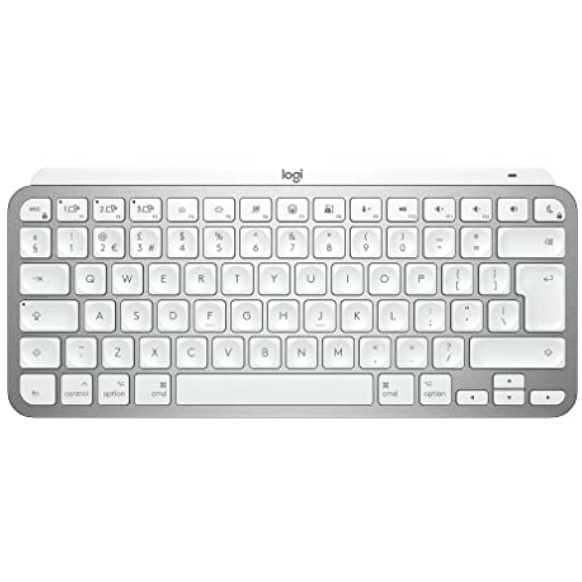
Bottom line: A comfortable compact keyboard with a style fit for an Apple-dominated desktop.
!function(f,b,e,v,n,t,s){if(f.fbq)return;n=f.fbq=function()
{n.callMethod? n.callMethod.apply(n,arguments):n.queue.push(arguments)}
;if(!f._fbq)f._fbq=n;
n.push=n;n.loaded=!0;n.version=’2.0′;n.queue=[];t=b.createElement(e);t.async=!0;
t.src=v;s=b.getElementsByTagName(e)[0];s.parentNode.insertBefore(t,s)}(window,
document,’script’,’https://connect.facebook.net/en_US/fbevents.js’);
fbq(‘init’, ‘1765793593738454’);
fbq(‘track’, ‘PageView’);




![This rugged mouse will conquer your multicomputer setup [Review] ★★★★½](https://behalfofapple.com/wp-content/uploads/2022/12/Zagg-Pro-Mouse-hero-75x75.jpg?crop=1)







