TRENDING
  • About
  • Contact
No Result
View All Result
  • Home
  • News
  • Review
  • Devices
    • Apple Gadget
    • Ipad
    • Iphone
    • Macbook
  • Apps
  • Compares
SUBSCRIBE
  • Home
  • News
  • Review
  • Devices
    • Apple Gadget
    • Ipad
    • Iphone
    • Macbook
  • Apps
  • Compares
No Result
View All Result
No Result
View All Result
Home Apps

iOS 17: How to Choose Which App Siri Uses to Send a Message

by
September 8, 2023
in Apps
0
iOS 17: How to Choose Which App Siri Uses to Send a Message
465
SHARES
1.5k
VIEWS
Share on FacebookShare on Twitter

In iOS 17, Siri has learned a few more useful features worth knowing about. One is the ability to use Siri to send messages to friends and family over compatible third-party apps. Keep reading to learn how it’s done.


When you ask ‌Siri‌ to send a message in iOS 17, you can now tap to select which app on your iPhone that you want to send it from. This allows you to send messages not just from Apple’s built-in Messages app, but also third-party apps like Telegram and WhatsApp.

The feature is compatible with any third-party app whose settings include the “Use with Ask ‌Siri‌” option. To check if an app has the option, or to enable/disable it, follow these steps.

  1. Open the Settings app on your iPhone.
  2. Tap Siri & Search.
  3. Scroll down to the apps list and tap the app in question.
  4. Toggle the switch next to Use with Ask Siri.

settings

  • When Will iOS 17 Be Released?

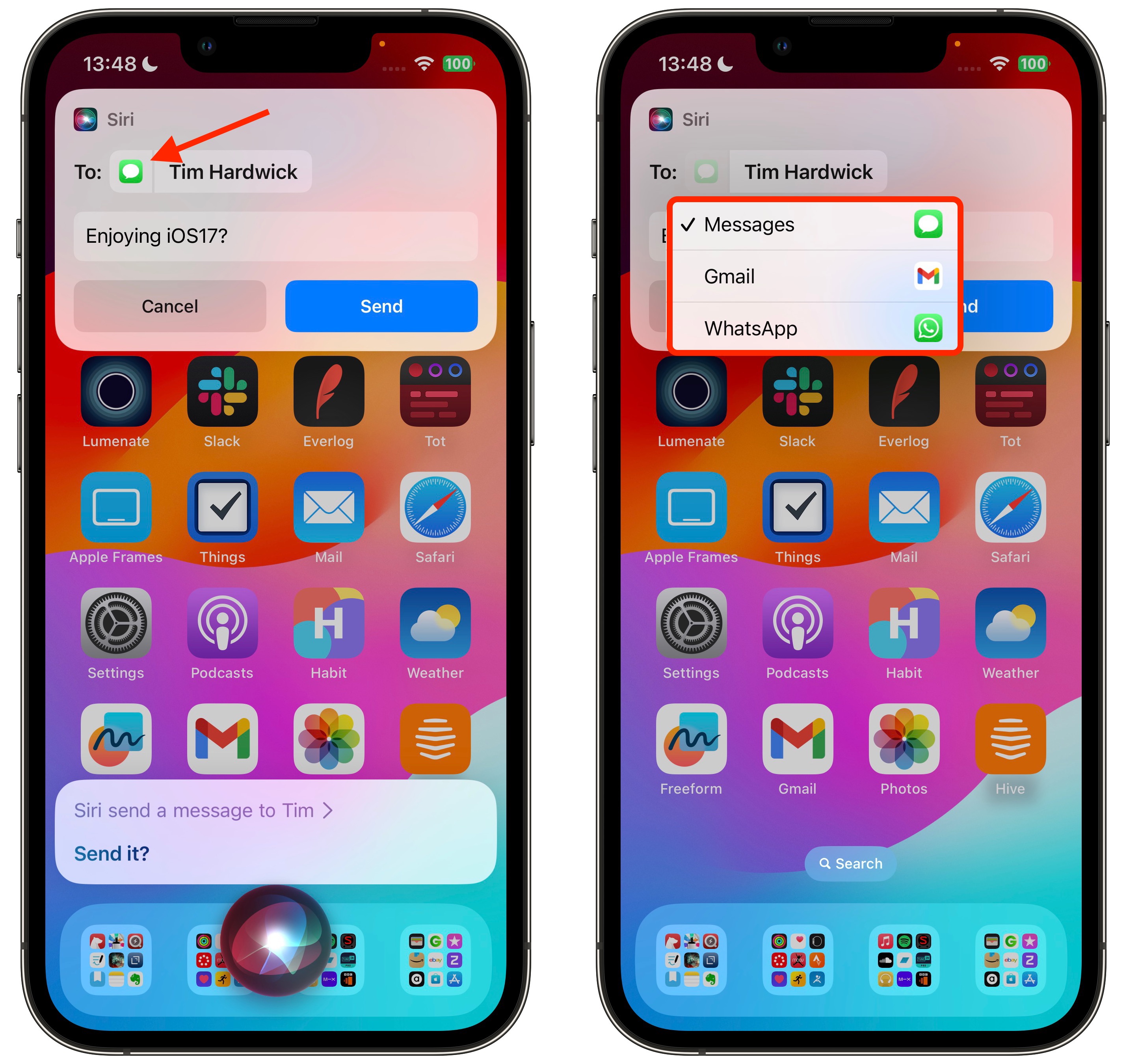
If “Use with Ask Siri” is enabled for a particular app, you can manually choose it each time you ask the voice assistant to send a message. Here’s how.

  1. Activate Siri by saying “Hey Siri” or just “Siri,” or by pressing and holding the Side button on your iPhone until the Siri orb appears on the screen.
  2. Ask Siri to send a message to one of your contacts.
  3. In the message card that appears at the top of the screen, tap the Messages icon next to the person’s name.
  4. Tap another compatible messaging app in the dropdown to select it.
  5. Type your message in the input field, then tap Send.
siri

There’s nothing more to it. ‌In iOS 17, Siri‌ is also able to recognize and respond to multiple back-to-back requests without needing to be reactivated.

  • Will My iPhone Run iOS 17?

You can, for example, ask ‌Siri‌ to tell you the time, and then follow that up with a request to text your friend that you’re going to be late all in the same ‌Siri‌ request. For more details on what’s new for Siri in iOS 17, check out our dedicated guide.

Tag: Siri

This article, "iOS 17: How to Choose Which App Siri Uses to Send a Message" first appeared on MacRumors.com

Discuss this article in our forums

Source link

Share this:

  • Share on X (Opens in new window) X
  • Share on Facebook (Opens in new window) Facebook

Like this:

Like Loading...
Share186Tweet116Share47

Related Posts

The ultimate in pet entertainment: Jolly Dog [Awesome Apps]
Apps

The ultimate in pet entertainment: Jolly Dog [Awesome Apps]

October 6, 2023
How to master the camera app on iPhone 15 Pro & 15 Pro Max
Apps

How to master the camera app on iPhone 15 Pro & 15 Pro Max

October 6, 2023
Google, Apple face fines in South Korea for breaching in-app billing rules
Apps

Google, Apple face fines in South Korea for breaching in-app billing rules

October 6, 2023
South Korea threatens to fine Apple over App Store dominance
Apps

South Korea threatens to fine Apple over App Store dominance

October 6, 2023
Get an exclusive $20 off this top rated investment advising app
Apps

Get an exclusive $20 off this top rated investment advising app

October 5, 2023
Apple Launches SF Symbols 5 With 700+ New Icons for Developers to Use in Apps
Apps

Apple Launches SF Symbols 5 With 700+ New Icons for Developers to Use in Apps

October 5, 2023
Next Post
Level up your serve with AI-powered tennis coaching iPhone app SwingVision

Level up your serve with AI-powered tennis coaching iPhone app SwingVision

Leave a ReplyCancel reply

Recommended

The overlap between Apple Music and Classical app is clunky

The overlap between Apple Music and Classical app is clunky

March 28, 2023
iPhone SE 4 Rumored to Feature 6.1-Inch LCD Display With Notch

iPhone SE 4 Rumored to Feature 6.1-Inch LCD Display With Notch

October 9, 2022
White House calls Apple and Google ‘harmful’ in bid to cut app store fees

White House calls Apple and Google ‘harmful’ in bid to cut app store fees

February 1, 2023
Apple to show ads on App Store homepage in new, more prominent format

Apple to show ads on App Store homepage in new, more prominent format

June 20, 2023
Apple launches its new classical music streaming app for pre-order

Apple launches its new classical music streaming app for pre-order

March 9, 2023
iPhone, Mac driving June quarter results in-line with Wall Street forecasts

iPhone, Mac driving June quarter results in-line with Wall Street forecasts

July 11, 2022
Facebook Twitter Youtube Pinterest
Behalf of Apple

behalfofapple.com is a Tech News Website. We provide you with the latest breaking news and videos straight from the Apple Tech News industry.

Categories

  • Apple Gadget
  • Apps
  • Ipad
  • Iphone
  • News
  • Review

Quick Menu

  • Home
  • About
  • Contact
  • Disclaimer
  • Privacy Policy
  • Terms and Conditions

Copyright © 2022 behalfofapple.com

No Result
View All Result
  • About
  • Contact
  • Disclaimer
  • Home
  • Privacy Policy
  • Terms and Conditions

Copyright © 2022 behalfofapple.com

Discover more from Behalf of Apple

Subscribe now to keep reading and get access to the full archive.

Continue reading

Go to mobile version
 

Loading Comments...
 

    %d
      • Disclaimer: We are not affiliated, associated, authorized, endorsed by, or in any way officially connected with Apple. We are merely a tech news organization.