
TRENDING
  • About
  • Contact
No Result
View All Result
  • Home
  • News
  • Review
  • Devices
    • Apple Gadget
    • Ipad
    • Iphone
    • Macbook
  • Apps
  • Compares
SUBSCRIBE
  • Home
  • News
  • Review
  • Devices
    • Apple Gadget
    • Ipad
    • Iphone
    • Macbook
  • Apps
  • Compares
No Result
View All Result
No Result
View All Result
Home Devices Apple Gadget

How to use Visual Look Up on iPhone and iPad

by
April 29, 2022
in Apple Gadget, Ipad, Iphone
0
How to use Visual Look Up on iPhone and iPad
465
SHARES
1.5k
VIEWS
Share on FacebookShare on Twitter

Iphone 13 Pro Photos Shared Album Activity HeroSource: Christine Romero-Chan / iMore

There are many improvements to existing features in iOS 15, including FaceTime, Messages, Focus, and more. Some of the brand new features include Live Text and Visual Look Up, which kind of go hand-in-hand with each other. Visual Look Up uses machine learning and intelligence to give users information on various objects, places, animals, flowers and plants, and more in their pictures in the Photos app.

Visual Look Up is a very useful and informative feature that will help many people learn more about what they have photographed. This is going to be particularly handy to have when you take a picture of something because you can’t identify it — Visual Look Up will come to your rescue.

Here’s how to use Visual Look Up on iPhone and iPad.

What devices can use Visual Look Up?

First thing’s first — only some devices will be able to use the Visual Look Up feature, even though iOS 15 and iPadOS 15 are compatible with older devices. The one requirement for Visual Look Up is that the device needs to have at least an A12 Bionic chip, which eliminates older models. In case you missed it, here is the full list of compatible A12 (and later) devices:

If you are using an older model that is not listed, then you may want to consider upgrading to the best iPhone and best new iPad — Visual Look Up is a very nice feature to have.

How to use Visual Look Up in iOS 15 and iPadOS 15

  1. Launch Photos on your iPhone or iPad.
  2. Look for a photo that has sparkly stars on the “i” button.
  3. Tap the “i” button when it has the sparkly stars on it.
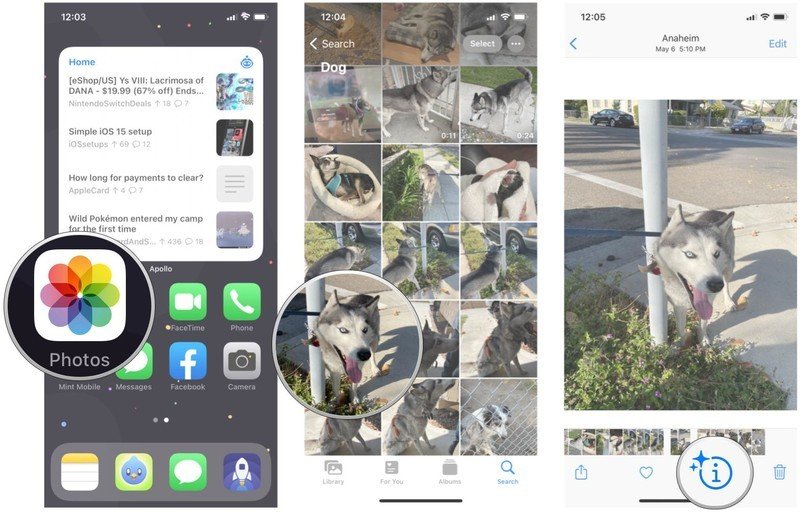
    How to use Visual Look Up on iPhone by showing: Launch Photos, find a photo with something you want to look up, look for the sparkly stars on the info buttonHow to use Visual Look Up on iPhone by showing: Launch Photos, find a photo with something you want to look up, look for the sparkly stars on the info buttonSource: iMore

  4. While this brings up the information panel, you should also see a Visual Look Up button on the image itself. This button will have a different icon on it, depending on what it is. For example, if it is an animal, you’ll see a paw print.
  5. Tap the Visual Look Up button.
  6. It should bring up results using Siri Knowledge, and you can browse for similar results on the web.
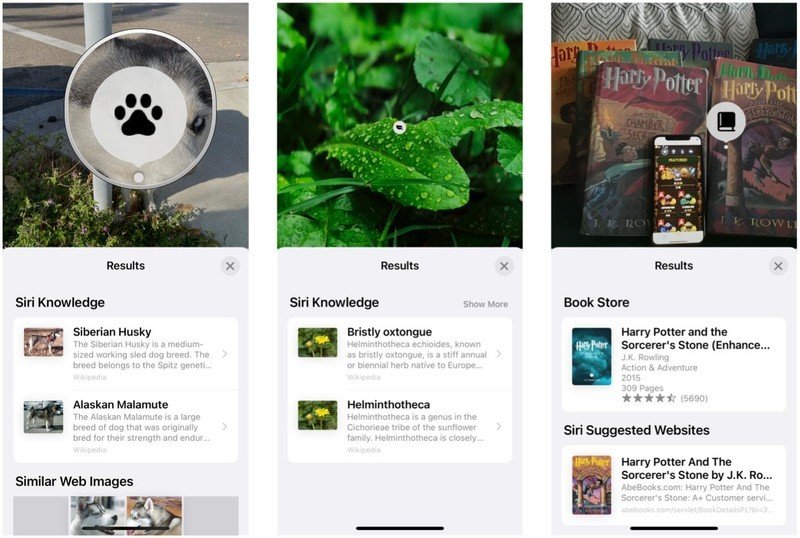
    How to use Visual Look Up on iPhone by showing: Tap the Visual Look Up icon on a photo to bring up Siri resultsHow to use Visual Look Up on iPhone by showing: Tap the Visual Look Up icon on a photo to bring up Siri resultsSource: iMore

This feature will need to go through all of your photos to process and index the results. If you have a lot of photos, this may take a while. I also found that so far, it works best with animals, plants, and some objects. I’ve had problems getting locations to work — hopefully, this is ironed out in future betas before the final release.

Live text is another useful feature in iOS 15

As long as you have an A12-equipped iPhone or iPad, Visual Look Up is a cool feature that lets you get information on the things that you photograph. It’s handy to have when you want to try identifying something or just learn more.

Another trick your best iPhone picked up in iOS 15 is the ability to read text via the camera or off of photos — it’s called Live Text. Learning how to use Live text can be super handy.

Updated April 2022: With the latest steps.

These are the 10 best Kirby games of all timeThese are the 10 best Kirby games of all time

Celebrating Kirby


These are the 10 best Kirby games of all time

Kirby has been around for over 30 years now and he’s been in over 30 video games as well. After analyzing his adventures, we’ve determined which ones are the best of the best.

(function(d, s, id) {
var js, fjs = d.getElementsByTagName(s)[0];
if (d.getElementById(id)) return;
js = d.createElement(s); js.id = id;
js.src = “//connect.facebook.net/en_US/sdk.js#xfbml=1&version=v2.7”;
js.defer = 1;
fjs.parentNode.insertBefore(js, fjs);
}(document, ‘script’, ‘facebook-jssdk’));

var fbAsyncInitOrg = window.fbAsyncInit;
window.fbAsyncInit = function() {
if(typeof(fbAsyncInitOrg)==’function’) fbAsyncInitOrg();
FB.init({
appId: “291830964262722”,
xfbml: true,
version : ‘v2.7’
});

FB.Event.subscribe(‘xfbml.ready’, function(msg) { // Log all the ready events so we can deal with them later
var events = fbroot.data(‘ready-events’);
if( typeof(events) === ‘undefined’) events = [];
events.push(msg);
fbroot.data(‘ready-events’,events);
});

var fbroot = $(‘#fb-root’).trigger(‘facebook:init’);
};

Source link

Share this:

  • Share on X (Opens in new window) X
  • Share on Facebook (Opens in new window) Facebook

Like this:

Like Loading...
Share186Tweet116Share47

Related Posts

iPhone not hit by Southeast Asia’s collapsing smartphone market
Apple Gadget

iPhone not hit by Southeast Asia’s collapsing smartphone market

November 17, 2022
Indian iPhone owners could finally get 5G support in December
Apple Gadget

iPhone 14 is no longer banned in Colombia, here’s why

November 17, 2022
Foxconn delays reducing iPhone plant production plan over Covid-19 outbreak
Apple Gadget

Foxconn needs 100,000 more workers at its Zhengzhou iPhone plant

November 17, 2022
The world’s biggest iPhone factory has lost 100,000 workers fleeing COVID lockdowns, a third of its workforce
Apple Gadget

The world’s biggest iPhone factory has lost 100,000 workers fleeing COVID lockdowns, a third of its workforce

November 17, 2022
A16 Chip in iPhone 14 Pro Reportedly Costs Apple Over Twice as Much as A15 Chip
Apple Gadget

iPhone 14 Pro’s A16 Bionic Outperforms Latest Snapdragon 8 Chip Coming to Android Phones Later This Year

November 17, 2022
iPhone 15 Pro could feature significantly faster wired data transfer speeds
Apple Gadget

iPhone 15 Pro could feature significantly faster wired data transfer speeds

November 17, 2022
Next Post
Apps About Pets

Apps About Pets

Leave a ReplyCancel reply

Recommended

The overlap between Apple Music and Classical app is clunky

The overlap between Apple Music and Classical app is clunky

March 28, 2023
iPhone SE 4 Rumored to Feature 6.1-Inch LCD Display With Notch

iPhone SE 4 Rumored to Feature 6.1-Inch LCD Display With Notch

October 9, 2022
White House calls Apple and Google ‘harmful’ in bid to cut app store fees

White House calls Apple and Google ‘harmful’ in bid to cut app store fees

February 1, 2023
Apple to show ads on App Store homepage in new, more prominent format

Apple to show ads on App Store homepage in new, more prominent format

June 20, 2023
Apple launches its new classical music streaming app for pre-order

Apple launches its new classical music streaming app for pre-order

March 9, 2023
iPhone, Mac driving June quarter results in-line with Wall Street forecasts

iPhone, Mac driving June quarter results in-line with Wall Street forecasts

July 11, 2022
Facebook Twitter Youtube Pinterest
Behalf of Apple

behalfofapple.com is a Tech News Website. We provide you with the latest breaking news and videos straight from the Apple Tech News industry.

Categories

  • Apple Gadget
  • Apps
  • Ipad
  • Iphone
  • News
  • Review

Quick Menu

  • Home
  • About
  • Contact
  • Disclaimer
  • Privacy Policy
  • Terms and Conditions

Copyright © 2022 behalfofapple.com

No Result
View All Result
  • About
  • Contact
  • Disclaimer
  • Home
  • Privacy Policy
  • Terms and Conditions

Copyright © 2022 behalfofapple.com

Discover more from Behalf of Apple

Subscribe now to keep reading and get access to the full archive.

Continue reading

Go to mobile version
%d
    • Disclaimer: We are not affiliated, associated, authorized, endorsed by, or in any way officially connected with Apple. We are merely a tech news organization.