TRENDING
  • About
  • Contact
No Result
View All Result
  • Home
  • News
  • Review
  • Devices
    • Apple Gadget
    • Ipad
    • Iphone
    • Macbook
  • Apps
  • Compares
SUBSCRIBE
  • Home
  • News
  • Review
  • Devices
    • Apple Gadget
    • Ipad
    • Iphone
    • Macbook
  • Apps
  • Compares
No Result
View All Result
No Result
View All Result
Home News

How to edit or unsend an iMessage in iOS 16

by
July 29, 2022
in News
0
How to edit or unsend an iMessage in iOS 16
465
SHARES
1.5k
VIEWS
Share on FacebookShare on Twitter

We’ve all done it: sent a text message and then instantly regretted it. Whether it was a text to your parent with a spelling error that they’d never let you live down, a message with a wrong word in it (“I don’t want to come to the party!” instead of “I want to come to the party!”), or a sudden realization that you just sent your message to the wrong person — it can be embarrassing at the least and disastrous at the worst.

While messaging apps like Signal, WhatsApp, and Viber all have some version of “delete for everyone,” until now, there was nothing you could do about it on iMessage except to follow it up with an “I didn’t mean that!” message.

In the iOS 16 beta, Apple introduced a feature to its iMessage chat app that allows you to unsend and edit a sent message — with some rules in place, which I’ll explain below. (In addition, the feature won’t work unless the recipient is also on iOS 16, iPadOS 16, or macOS Ventura.)

To delete the message
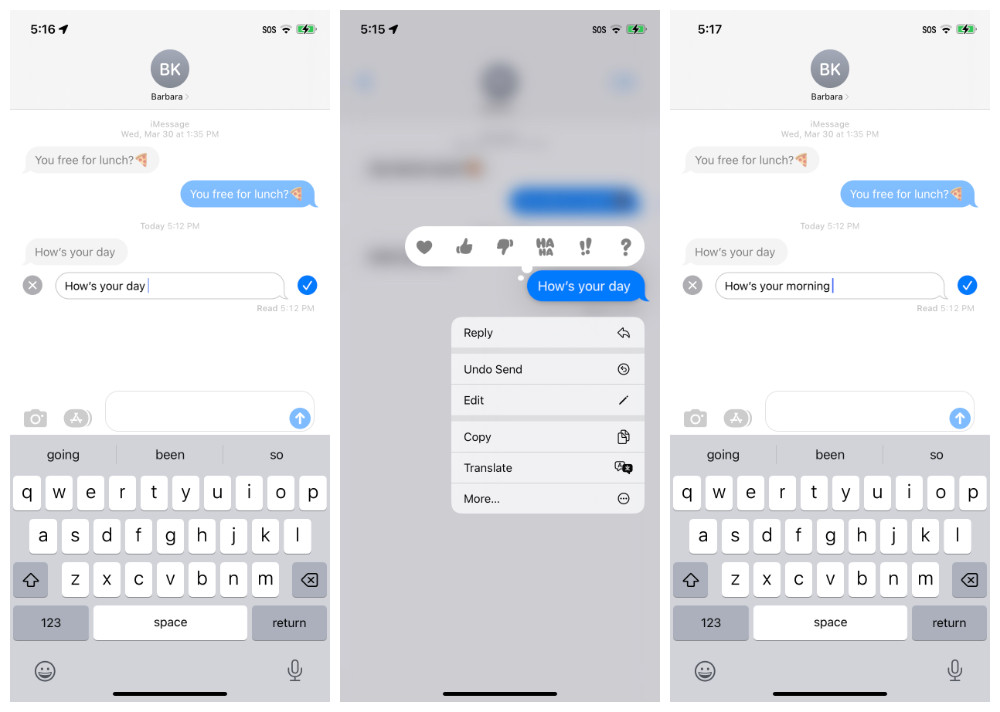
3 iOS screens showing a message being edited

To delete a sent message, long-press on the message within two minutes of sending.

  • Long-press on the message.
  • On the drop-down menu, tap Undo Send.
  • The message will immediately disappear (in a rather pretty “poof”).

In the first public beta, you were allowed 15 minutes to unsend your message. However, if you’ve installed the second public beta, that has been changed to two minutes. After two minutes, the option will disappear from the drop-down menu.

To change the message

iMessage with edits showing

You can see all of your previous edits.

  • Long-press on the message.
  • On the drop-down menu, tap Edit.
  • Edit your message and tap the check mark to the right of the message to send the correction. (Or tap the “x” to the left of the message if you’ve changed your mind about changing the text.)
  • If you want to see all of your edits, tap on the small Edited link below the message. You can then tap on Hide Edits in order to just see the last message.

You have a little more time to edit a message — a full 15 minutes. If you long-press on your message after 15 minutes have passed, then the Edit option will no longer be on the menu. But the second public beta added a new limitation: while you could edit that message as many times as you wanted in the first public beta, you now can only edit it up to five times; after that, the Edit option in the drop-down menu disappears.

And a reminder that neither option works if your recipient is on an earlier version of the OS (so don’t rely on this feature during the public beta). And there may be some other issues that you want to be aware of when using this feature. Still, it can be very handy.

Update July 28th, 2022, 10:45AM ET: This article was originally published on July 15th, 2022, and has been updated to account for changes in the OS (specifically, the amount of time you have to unsend a message and the number of times you can edit it).

Source link

Share this:

  • Twitter
  • Facebook

Like this:

Like Loading...
Share186Tweet116Share47

Related Posts

Head to Space in the Classic Graphic Adventure Game Dexter Stardust
News

Head to Space in the Classic Graphic Adventure Game Dexter Stardust

August 12, 2022
Facebook avoids European blackout as regulators squabble over EU-US data transfers  – TechCrunch
News

Facebook avoids European blackout as regulators squabble over EU-US data transfers  – TechCrunch

August 12, 2022
Telegram founder blames Apple for holding back a major update
News

Telegram founder blames Apple for holding back a major update

August 12, 2022
What’s new in advertising attribution technologies – Latest News
News

Upcoming AppTrackingTransparency requirements – Latest News

August 12, 2022
Apple TV+ picks up dark comedy Physical for third season
News

Apple TV+ picks up dark comedy Physical for third season

August 11, 2022
Apple renews Rose Byrne’s dramedy series Physical for a third season
News

Apple renews Rose Byrne’s dramedy series Physical for a third season

August 11, 2022
Next Post
Apple’s latest iOS 16 beta introduces a history log for edited messages – TechCrunch

Mac sales down 10%, iPhones up 3% — Breaking down Apple’s quarterly numbers – TechCrunch

Leave a ReplyCancel reply

Recommended

From the Editor’s Desk: Could we see the iPhone 14 on September 7?

From the Editor’s Desk: Could we see the iPhone 14 on September 7?

August 21, 2022
Next-gen iPhone SE might look similar to iPhone XR

Next-gen iPhone SE might look similar to iPhone XR

August 30, 2022
Big iA Writer Update Brings Wikilinks Feature and More

Big iA Writer Update Brings Wikilinks Feature and More

June 19, 2022
Apple unlikely to announce its rumored AR/VR headset at WWDC next week, says Kuo

Apple unlikely to announce its rumored AR/VR headset at WWDC next week, says Kuo

May 31, 2022
iPhone 14 Pro and Redesigned MacBook Air Reportedly Stuck Using Technology Behind A15 Chip

iPhone 14 Pro and Redesigned MacBook Air Reportedly Stuck Using Technology Behind A15 Chip

May 29, 2022
Belkin Boost Charge Pro 3-in-1 Wireless Charging Pad review: AirPower resurrected

Belkin Boost Charge Pro 3-in-1 Wireless Charging Pad review: AirPower resurrected

August 19, 2022
Facebook Twitter Youtube Pinterest
Behalf of Apple

behalfofapple.com is a Tech News Website. We provide you with the latest breaking news and videos straight from the Apple Tech News industry.

Categories

  • Apple Gadget
  • Apps
  • Ipad
  • Iphone
  • News
  • Review

Quick Menu

  • Home
  • About
  • Contact
  • Disclaimer
  • Privacy Policy
  • Terms and Conditions

Copyright © 2022 behalfofapple.com

No Result
View All Result
  • About
  • Contact
  • Disclaimer
  • Home
  • Privacy Policy
  • Terms and Conditions

Copyright © 2022 behalfofapple.com

Discover more from Behalf of Apple

Subscribe now to keep reading and get access to the full archive.

Subscribe

Continue reading

Go to mobile version
%d
    • Disclaimer: We are not affiliated, associated, authorized, endorsed by, or in any way officially connected with Apple. We are merely a tech news organization.