AppleInsider is supported by its audience and may earn commission as an Amazon Associate and affiliate partner on qualifying purchases. These affiliate partnerships do not influence our editorial content.
Apple has revealed that the next edition of the Mac operating system is to be called macOS Ventura, and amongst many new or improved features, its notable additions include Stage Manager, which helps when coping with many open windows.
Announced at the WWDC 2022 keynote, the new macOS will be available in early beta form for developers shortly.
As expected, the new macOS Ventura is a further refinement of the operating system instead of the wholesale change that was brought in with macOS Big Sur, or version 11, in 2020. Nonetheless, the new version is officially macOS 13.
Continuity Camera brings Center Stage to Mac
The existing Continuity Camera feature lets a Mac control an iPhone to scan documents. Now it’s being extended to let Mac use an iPhone as a webcam.
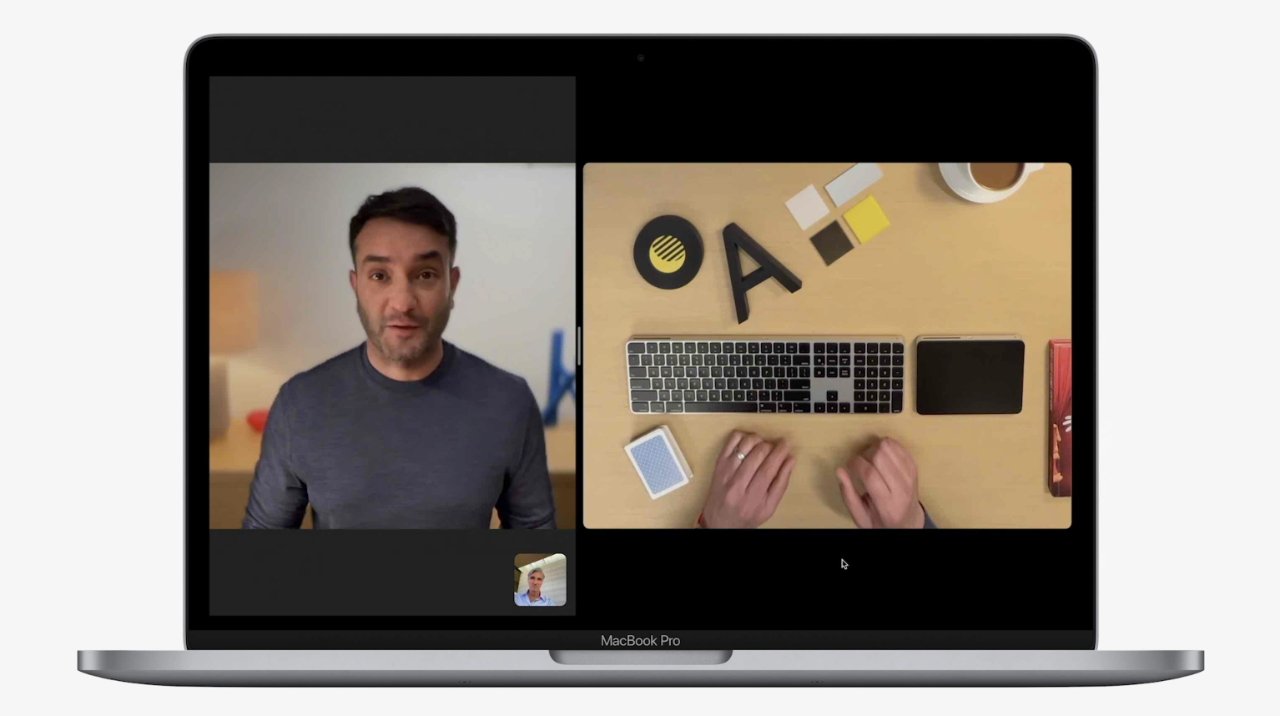
“With the power of Continuity,” says Apple, “Mac can automatically recognize and use the camera on iPhone when it is nearby — without the need to wake or select it — and iPhone can even connect to Mac wirelessly for greater flexibility.”
“Continuity Camera delivers innovative features to all Mac computers including Center Stage, Portrait mode, and the new Studio Light,” continues Apple, “an effect that beautifully illuminates a user’s face while dimming the background.”
The new webcam feature is not just for bringing higher-resolution FaceTime images to Macs. “Continuity Camera [also] taps into the Ultra Wide camera on iPhone to enable Desk View, which simultaneously shows the user’s face and an overhead view of their desk.”
New features Stage Manager and updated Spotlight
The new macOS Ventura adds Stage Manager, a way of handling multiple windows across many apps that are open at the same time.
“With Stage Manager, you can focus on the app you’re using without the distractions,” said Craig Federighi. “[It] automatically arranges all my windows for me off to the side and puts the app I’m currently working with front and centre.”
When a user brings forward a second app, the first “gracefully moves over to the left” of the screen with other recent apps.

Stage Manager in macOS Ventura
Stage Manager can gather all of an app’s open windows “together in a single pile,” and users can drag files directly onto the apps in the pile.
Apple has also updated Spotlight.
“Spotlight can now also find images from your photo library, across the system and on the web,” said Federighi, “and using live text, you can search the text inside the image.”
“You can also take actions like starting a timer or running a shortcut right from spotlight,” he continued. “It’s also a great way to get information now leveraging the full window for richer results.”
New features in Mail
Mail is gaining new productivity tools, including the ability to retract a sent email. As with third-party Mac mail clients, users will have 10 seconds after hitting Send in which to undo it.
A similar feature is coming to Messages in macOS Ventura, too.
For Mail, Apple says that users “can edit or recall a message for up to 15 minutes after sending it, or recover recently deleted messages for up to 30 days after deletion.”
Also as with many rival Mac mail apps, Apple Mail in macOS Ventura will now allow users to schedule when an email gets sent.
Mail is also adding improvements to search, which will automatically surface recently shared documents.

Apple’s macOS Ventura
Security features
Apple is introducing new security tools including Rapid Security Response. This “works in between normal updates to easily keep security up to date without a reboot.”
As previously reported, Apple is also starting the process of introducing what it calls Passkeys.
“Passkeys use powerful cryptographic techniques and the biometrics built into your device to keep account safe to create a passcode,” said Darin Adler, vice president, internet technologies. “Just use Touch ID or Face ID to authenticate and you’re done.”
A passkey is a “unique digital key is created that only works for the site it was created for.” These passkeys never leave a user’s device, so they can’t be leaked, they aren’t stored on a web server that could be hacked.
Gaming improvements
“We’re at a point where two things are really coming together [for gaming],” said Craig Federighi. “First, Apple Silicon has changed everything, it’s taking the graphics performance of every new Mac to new heights, giving Mac’s the power to run the most demanding games with ease.”
“Second, the Mac is more popular than ever,” he continued, “and it’s a huge and fast growing opportunity for game developers.”
Apple has introduced Metal 3, the latest version of its gaming tool, which now includes MetalFX Upscaling, which “enables developers to quickly render complex scenes by using less compute-intensive frames, and then apply resolution scaling and temporal anti-aliasing.”
More new features
There are always more features and refinements than Apple can announce in the WWDC Keynote, but it has given brief details of several further enhancements, and expanded on some others.
The old discrepancy between iOS’s Settings and the Mac’s System Preferences is changing to a slightly better discrepancy. The feature on the Mac will now be renamed System Settings, and it is redesigned to more resemble the iOS version.
Also coming from iOS are new Weather and Clock apps, plus Live Text has been extended to recognize text in video freeze-frames. Live Captions, previously announced for iOS, are coming to the Mac, alongside more accessibility tools.
Release schedule
As ever, a public beta of macOS 13 will follow at some unspecified point, most likely in July. That date can change, however, depending on how the developer beta tests go.
Ultimately the final public release is likely to be in September or October. From that time, it will come pre-installed on all new Macs.
All compatible existing Macs will get a software update notification around then as well.
What neither new or older Macs will necessarily see is the complete range of new features announced by Apple. Even the main headline new features can be removed before the public release, as happened in 2021 with the much delayed launch of Universal Control.

The new macOS Ventura supports passkeys, a replacement for passwords that uses biometric data
Which Macs can run the new macOS
Apple is traditionally very good at keeping older Mac up to date, but macOS Ventura does have more stringent requirements than macOS Monterey.
Nonetheless, every Apple Silicon Mac will run the new OS, but it will also work on certain older Intel-based machines.
- iMac: 2017 or later
- iMac Pro
- MacBook Air: 2018 and later
- MacBook Pro: 2017 and later
- Mac Pro: 2019 and later
- Mac mini: 2018 and later
- MacBook: 2017 and later
- Mac Studio
Note that the list is subject to change as we go through the beta process.
More details coming
Apple’s keynote presentation with Tim Cook is the highest-profile part of WWDC each year, but it is also the first part. There remains an entire week of developer sessions, and while it’s unlikely that any major new features will be unveiled, it’s certain that much more detail will be revealed.
This year Apple has also opened a new Developer Center, which the selected few in-person attendees at WWDC will be able to see. We’re likely, then, to get rapid first-look opinions of the new features in action.
Release schedule
As ever, a public beta of macOS 13 will follow at some unspecified point, most likely in July. That date can change, however, depending on how the developer beta tests go.
Ultimately the final public release is likely to be in September or October. From that time, it will come pre-installed on all new Macs.
All compatible existing Macs will get a software update notification around then as well.
What neither new or older Macs will necessarily see is the complete range of new features announced by Apple. Even the main headline new features can be removed before the public release, as happened in 2021 with the much delayed launch of Universal Control.
Which Macs can run the new macOS
Apple is traditionally very good at keeping older Mac up today. Every Apple Silicon Mac will run the new OS, but it will also work on certain older Intel-based machines.
Though the list is subject to change as we go through the beta process, currently the Macs expected to work with the new macOS are the same as those for 2021’s macOS Monterey.
More details coming
Apple’s keynote presentation with Tim Cook is the highest-profile part of WWDC each year, but it is also the first part. There remains an entire week of developer sessions, and while it’s unlikely that any major new features will be unveiled, it’s certain that much more detail will be revealed.
This year Apple has also opened a new Developer Center, which the selected few in-person attendees at WWDC will be able to see. We’re likely, then, to get rapid first-look opinions of the new features in action.