


We see plenty of paired HomePod minis in our travels online among computer setups, but not many stereo twosomes of the OG HomePods, the big ones Apple discontinued. So today’s featured M1 MacBook Air setup is not only super-clean, it rocks that killer sound system and boasts a pricey 5K monitor that rivals Apple’s Studio Display.
And it marks the first time we’ve come across someone hating on the wildly popular Logitech MX Master 3 wireless mouse.
This post contains affiliate links. Cult of Mac may earn a commission when you use our links to buy items.
M1 MacBook Air drives brilliant 5K display and dual HomePods
Redditor essayyjay (“Jay”) showcased their setup and talked about it in a post entitled, “Winter setup.” That resulted in someone asking about the “summer setup,” of course. You can see the photo Jay posted in response below. It better-displays those big, beautiful paired HomePods.
The original HomePod, discontinued in 2021, is going up in value on the used market, by the way. Some folks predict it’ll make a comeback in some form soon, too.
And with those speakers Jay uses an M1 MacBook Air. And they’re quite fond of it.
“I love this little machine that could,” they said. “My first MacBook was an Air that went strong for 8 years till the RAM gave up.”
Along with the slender MacBook, Jay runs an impressive, 27-inch LG UltraFine 5K IPS display. That’s roughly equivalent to Apple’s Studio Display, though at $1,500 it costs $100 less.
Like Apple’s display, the LG flaunts 5120 x 2880 pixel resolution (5K) and three USB-C ports. Its Thunderbolt port delivers a touch less power, 94W versus the Studio Display’s 96W. The LG achieves 500 nits of brightness to the Studio Display’s 600 nits. Both run at a Mac-friendly 60Hz refresh rate.
The main features the Studio Display has over the LG are a 12MP camera and a six-speaker sound system.
Complaints about the Logitech MX Master 3 wireless mouse
We see the Logitech MX Master 3 wireless mouse in setups at least as much as we see the Magic Mouse. What we don’t see is people complaining about the popular Logi input device. Until now.
“Wish I knew how not so good this mouse was out of the box,” Jay said. Naturally, people wondered what prompted that attitude. Turns out their previous device was a Magic Mouse.
Here’s Jay’s explanation:
I’ll start by saying that the MX Master is a good mouse and takes a bit of getting used to (especially coming from a Magic Mouse). I love the Magic Mouse but recently my hand had started to hurt so I thought I’d give a mouse with better ergonomics a go. Out of the box, the scrolling felt quite off, even with Logitech’s new beta s/w. I found that the smooth scroll would also stop working from time to time which can get quite frustrating. Luckily there’s a bunch of great indie s/w like Mos, SteerMouse, Mac Mouse Fix, and Sensible Side Buttons that path some of the shortcomings. Also, you can use it while charging. +1000 points.
And he went on to reiterate the Logi mouse just took some getting used to.
“I’ve been now using this mouse for ~3 months and am pretty much used to its feel and find the fast scroll quite useful,” they said. “Most importantly, my hand has stopped hurting.”
Keychron K4 V2 mechanical keyboard
Along with the Logi mouse, Jay uses a Keychron K4 V2 mechanical keyboard. “Down the mech keyboard rabbit hole we go,” they said.
On their version of the keeb, which features a 96% Mac-centric layout and RGB backlighting, they use Drop MT3 BoW keycaps.
“Didn’t realise when I got the keycaps that it didn’t fully support 96%, but now I dig the stepped look for the top-right,” they said.

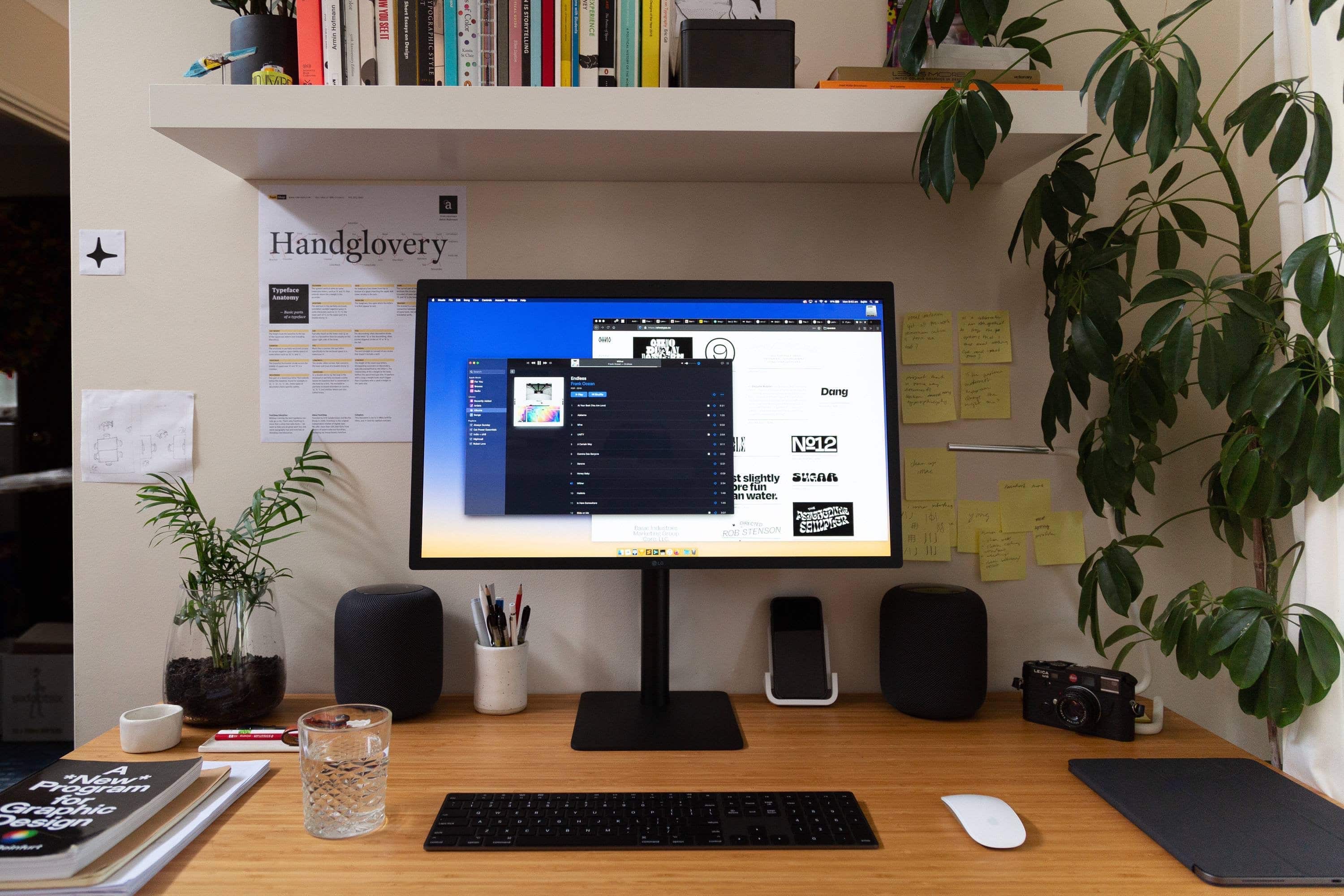
Photo: essayyjay@reddit.com
Shop these items now:
Computer:
Display and mount:
Input devices:
Audio:
If you would like to see your setup featured on Cult of Mac, send some high-res pictures to info+setups@cultofmac.com. Please provide a detailed list of your equipment. Tell us what you like or dislike about your setup, and fill us in on any special touches or challenges.
!function(f,b,e,v,n,t,s){if(f.fbq)return;n=f.fbq=function(){n.callMethod?
n.callMethod.apply(n,arguments):n.queue.push(arguments)};if(!f._fbq)f._fbq=n;
n.push=n;n.loaded=!0;n.version=’2.0′;n.queue=[];t=b.createElement(e);t.async=!0;
t.src=v;s=b.getElementsByTagName(e)[0];s.parentNode.insertBefore(t,s)}(window,
document,’script’,’https://connect.facebook.net/en_US/fbevents.js’);
// stack social info
fbq(‘init’, ‘309115492766084’);
fbq(‘track’, ‘EditorialView’);