AppleInsider is supported by its audience and may earn commission as an Amazon Associate and affiliate partner on qualifying purchases. These affiliate partnerships do not influence our editorial content.
The Monoprice 28-inch CrystalPro 4K monitor looks like a competitive budget monitor on paper, but audible coil noise and poor design ruin its potential.
The monitor market is more competitive than ever, so companies have to compete with design, quality of life implements, and unique features to stand out. The Monoprice 28-inch CrystalPro 4K monitor struggles to excel in any of those categories.
While this 4K monitor isn’t terrible for its price, it lies in a highly competitive portion of the market where there are a few dozen options with varying features. So, for every problem this monitor has, there are several that don’t.
Monoprice 28-inch CrystalPro 4K monitor design
There’s a lot to like about Monoprice’s display design at first glance. The display bezels are slim on three sides, and the thicker bottom bezel has a discreet logo.
The base rotates so the sides can sit flush with the corners of your desk, with the monitor facing the user diagonally.
We like the extreme difference between the stand’s lowest and highest height settings. You are much more limited if you use the display in portrait mode, but the tilt options provide some interesting angles.
The entire display is encased in black plastic, which is the standard for monitors in this price range. The display does have a slight wobble when typing, thanks to how it is mounted to the stand.

The monitor controls aren’t labeled, but they aren’t difficult to figure out
There are six buttons on the display with only one label for the power button. When changing monitor settings, the UI hovers over where the unlabeled buttons are, so it isn’t hard to figure out which one to press.
The screen has a matte texture, which is great for bright office environments. However, this texture is highly noticeable and causes a slight blur effect on content.
Overall, the design is in line with what we’d expect from a display that costs less than $400, but some critical oversights exist. The monitor itself is ok, but the stand it sits on is another matter.
First, the stand has a cable management system, a fancy way of saying a hole in the post for cables to stick through. But, strangely enough, that hole isn’t big enough to allow the power cable through.
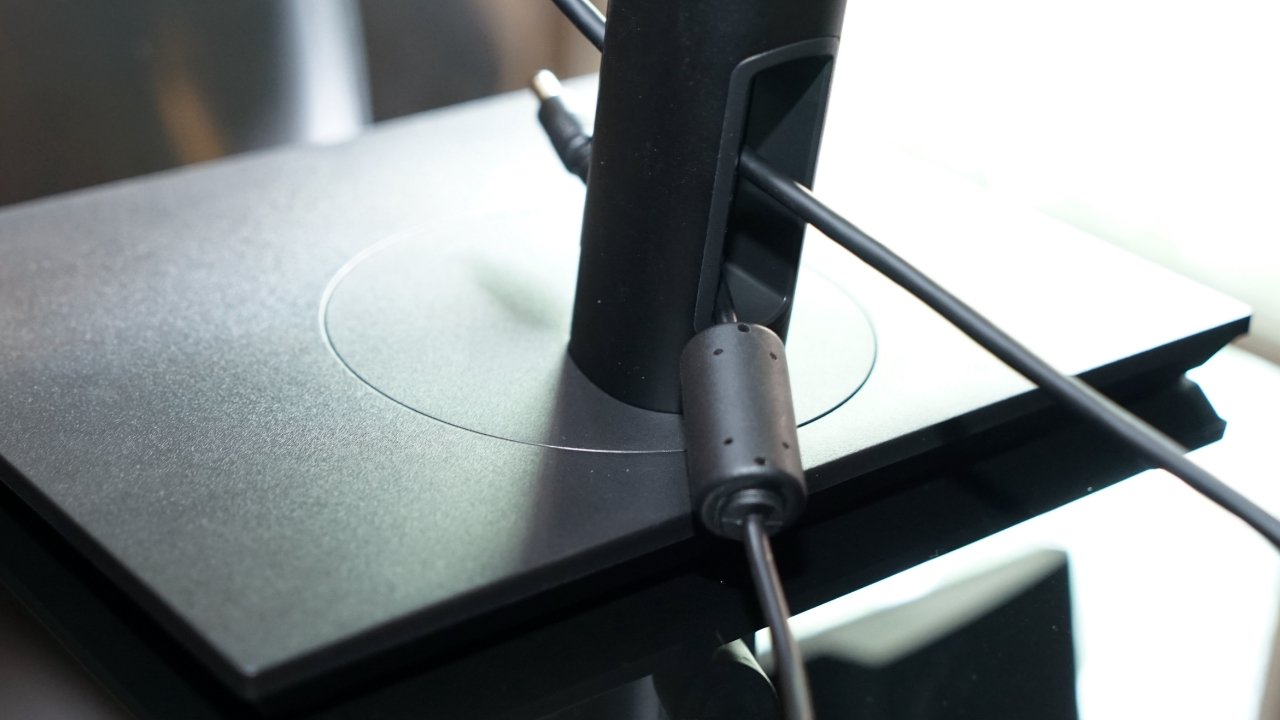
The power cable cannot fit through the cable managment hole in the stand
The power cable is hard-wired to the large power supply brick on one end, while the other has one of those ferrite cores near the AC plug. The ferrite core is too big to fit through the cable management hole, so it can’t fit through.
You end up left with a cable sticking out by itself, but with practically all other cables able to go through that management hole.
If you’re the type of person who doesn’t want to see cables on their desk, seek another monitor. The cable management hole is front and center, so all cables going through it are on full display.
Using the Monoprice 28-inch CrystalPro 4K monitor
If you can get over the poor design decisions, the Monoprice CrystalPro monitor isn’t that bad in use. The colors are accurate enough for general purposes but maybe not accurate enough for a photographer.
The promised HDR mode, however, is included for the sake of the spec page. We wouldn’t recommend anyone buy this monitor because it claims to be HDR compatible.
Once you’ve turned on HDR mode in the monitor settings and on macOS, the display immediately dims and takes on an off-green tint. Look elsewhere if you’re expecting to use your monitor for HDR editing or content.
Using the monitor through the USB-C port works great, and we appreciate it can keep our 14-inch MacBook Pro charged during use. The two downstream USB-A ports can be connected to accessories for the Mac to access as well.

There are plenty of port options for connecting multiple devices on your desk
There are built-in speakers in the CrystalPro display, but they shouldn’t be used except as a last resort. The audio quality is reminiscent of hold music — flat, empty, and oddly tinny.
We liked testing this monitor in portrait orientation. The overall footprint is much nicer with the stand obscured behind the large display, and it acts as a great second-monitor companion to our Studio Display.
Note that this is a 28-inch monitor with a 2160p display, meaning it isn’t Retina by Apple’s standards. At arms-length, the pixels are distinguishable to a discerning eye, especially when the monitor is placed next to a MacBook Pro.
There is one significant issue with the monitor during use — coil whine. While we cannot say if this is present in every shipping model, it is in this one.
Whenever the monitor is on and displaying content of any kind, a faint electrical noise can be heard coming from the monitor. The whine is enough to be drowned out by music, but those especially sensitive to the noise and frequency will always make it out.
We can’t attribute this coil whine to anything except cheap construction and parts. We’ve noted reviewing other Monoprice goods that the company can keep prices low while retaining premium-feeling materials and specs, but this monitor is an exception.
Should you buy the Monoprice 28-inch CrystalPro 4K monitor?

The Monoprice 28-inch CrystalPro monitor would make a good secondary monitor in portrait
We cannot recommend the Monoprice 28-inch CrystalPro 4K monitor. The lack of attention to detail with things like the cable management system and the constant coil whine make this monitor a poor option.
If you believe you can ignore the coil whine and want a cheap 4K monitor that can be used in portrait orientation, then this isn’t a bad choice. It shouldn’t be someone’s first or only monitor in any case.
Again, this isn’t a terrible display with its 2160p panel and decent color accuracy. Its specs are in line with what is expected for a monitor of this price and size.
However, the design and poor construction tradeoffs make this display less desirable overall.
We’d rate this monitor at 4 out of 5 if the coil whine wasn’t present and there was some thought to the cable management system. Instead, it has a lower score, which only really counts if you’re capable of ignoring the coil whine.
- Low-priced monitor with tilt-and-height adjustments
- Decent color reproduction and contrast
- 65W USB-C single-cable connection
- Audible coil whine during use
- Cable managment system is basically useless, power cable doesn’t fit through
- HDR mode dims display adds tint
- Built-in speakers should never be used except in worse-case scenario
Rating: 3 out of 5
Where to buy
The Monoprice 28-inch CrystalPro Monitor is available from Monoprice’s online store, priced at $359.99.